
Are you looking to optimise your website’s user experience (UX)? Look no further than Core Web Vitals! Core Web Vitals are a set of metrics that measure how your website performs, how usable it is, and how quickly it loads. In this comprehensive guide, you’ll learn how to measure Core Web Vitals, the impact they have on UX, and the best practices for optimising them. Get ready to improve your website’s UX, and make the most of Core Web Vitals!
What Are Core Web Vitals
You may be wondering what Core Web Vitals are and how they affect user experience. Core Web Vitals are a set of metrics used to measure the performance of a website. They are used by search engines like Google to evaluate how quickly a website loads and how smoothly it responds to user input. These metrics help Google to determine the quality of a website and its user experience. Core Web Vitals focus on three key areas: loading performance, interactivity, and visual stability.
Loading performance measures how quickly the initial content of a page loads, interactivity measures how quickly a page responds to user input, and visual stability measures how much the content of a page shifts or changes as it loads. By measuring these three areas, search engines can determine how quickly a website loads and how responsive it is to user input.
Core Web Vitals are important because they are directly related to user experience. If a website takes too long to load or is slow to respond to user input, users may become frustrated and may even leave the website. This can have a negative impact on user retention and overall website performance. It is therefore important for website owners to ensure that their website is meeting the Core Web Vitals standards.
Fortunately, there are tools available to help website owners measure and improve their Core Web Vitals. By using these tools, website owners can identify problem areas and make changes to their website to improve the overall performance and user experience. It is also important to keep an eye on the latest Core Web Vitals, as they can change over time. Keeping up to date with the latest Core Web Vitals will ensure that a website is always providing the best possible user experience. Find out more here.
How Are Core Web Vitals Measured
Measuring Core Web Vitals can be tricky, but it’s important to understand how they affect the user experience. Performance metrics such as First Input Delay, Largest Contentful Paint, and Cumulative Layout Shift are used to measure the speed and stability of a page, and making sure these values are optimised is key to providing a good user experience.
Calculating Performance Metrics
You’re likely wondering how Core Web Vitals are measured – and it’s a great question! Calculating performance metrics can be a complex process, but it’s essential for optimising user experience (UX). Here are 5 key things to keep in mind when measuring Core Web Vitals:
- Understand the Core Web Vitals metrics and how they impact UX
- Use tools like Google Lighthouse to track page performance
- Track Core Web Vitals over time to measure progress
- Identify areas of improvement on your website
- Make sure to stay up to date with the latest changes to Core Web Vitals metrics
Impact on UX
It’s essential to understand how Core Web Vitals are measured in order to effectively optimise user experience. Core Web Vitals are performance metrics that help determine the quality of user experience on a website. They measure loading, interactivity, and visual stability of a page. Consequently, they are directly linked to UX. Poor performance leads to a decrease in satisfaction, while good performance leads to improved UX. Therefore, website owners should strive to improve their Core Web Vitals scores to ensure their visitors are getting the best experience possible. Improving performance can be done by optimising code, compressing images, and minifying resources. Ultimately, improving Core Web Vitals leads to a better user experience.
Optimising Pages
You’ve got to optimise your pages if you want to measure core web vitals effectively, and that’s a must. Here are 5 key tips for optimising your pages for the best user experience:
- Utilise caching to reduce page loading times
- Reduce the size of your content and images
- Streamline your code to reduce render-blocking scripts
- Minimise the number of redirects on your site
- Monitor and adjust your page speed regularly.
What Impact Do Core Web Vitals Have on UX
You’ll notice a drastic improvement in your user experience when you optimise your website for Core Web Vitals. Core Web Vitals are a set of metrics which measure the speed, responsiveness, and stability of a website. These metrics help to ensure that users have a consistent and enjoyable experience when visiting a website. They are also important for SEO, as they are used by Google to rank websites in search engine results.
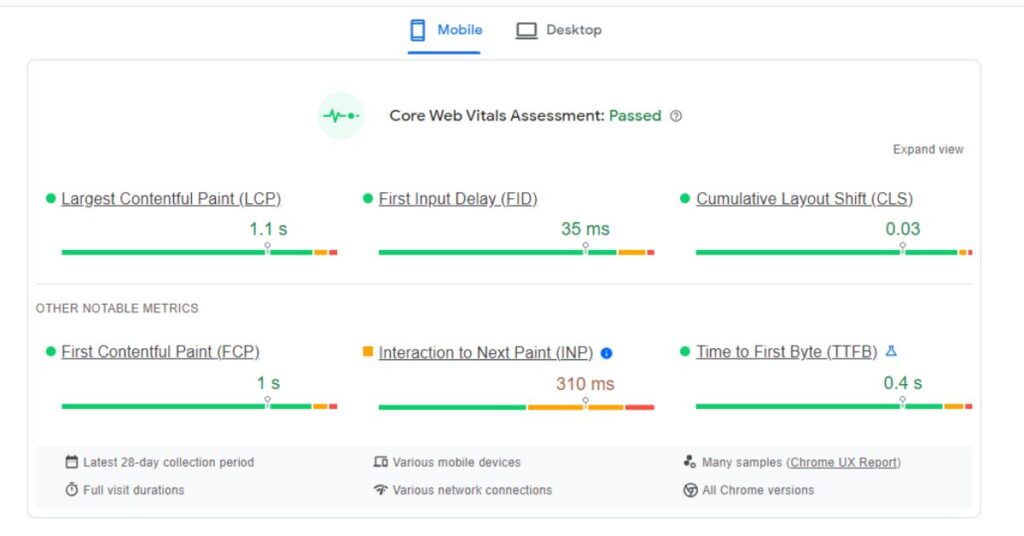
Google has identified three Core Web Vitals which are essential for a website’s UX: Largest Contentful Paint (LCP), First Input Delay (FID), and Cumulative Layout Shift (CLS). LCP measures how quickly the main content of the page is displayed. FID measures the time it takes for a user to interact with the page. Lastly, CLS measures how much the page layout shifts when the page is loading.
When optimising for Core Web Vitals, it’s important to focus on reducing the loading time of your website. This can be done by optimising images, using caching strategies, and minifying code. It’s also important to pay attention to the FID, as this plays a large role in user experience. You can reduce the FID by making sure that JavaScript is loaded asynchronously, and by deferring non-essential tasks.
Finally, make sure that your website is stable and that layout shifts are kept to a minimum. This can be achieved by avoiding large page elements that cause page jumps, and by ensuring that all elements on the page have a fixed size.
Core Web Vitals Tips for Improving UX
You can easily improve your user experience by following some Core Web Vitals tips. Here are five tips to help you get started in optimising your site for Core Web Vitals:
- Measure your Core Web Vitals metrics: Monitor the performance of your site with tools like Google PageSpeed or Lighthouse to measure your Core Web Vitals metrics. This will help you to identify any issues and prioritise which areas need improvement.
- Optimise your website for loading speed: Increase the loading speed of your website by minimising the amount of code, images, and other elements that are slowing it down. This will help to make your website more user-friendly.
- Minimise third-party scripts: Third-party scripts can cause delays in loading and affect the user experience. Make sure to keep the number of third-party scripts to a minimum to ensure your website is running as efficiently as possible.
- Optimise images: Image optimization is essential for improving your Core Web Vitals score. Compress images and use the appropriate formats to ensure they load quickly.
- Utilise caching: Caching can help to speed up the loading time of your website by storing static elements. This will improve your website performance and help to improve the user experience.
Best Practices for Assessing Core Web Vitals
To ensure your website is optimised for Core Web Vitals, it’s essential to assess your metrics regularly and make necessary adjustments. Here are some best practices for assessing Core Web Vitals:
| Area | Checklist | Tips |
| Largest Contentful Paint (LCP) | Measure how long it takes for the main content of a web page to load | Check the LCP of a page with the Chrome UX Report or PageSpeed Insights |
| First Input Delay (FID) | Measure the time from when a user first interacts with your page to the time when the browser can respond to that interaction | Use Chrome DevTools to measure FID |
| Cumulative Layout Shift (CLS) | Measure how much unexpected movement of page content occurs during loading and user interactions | Monitor CLS with Chrome DevTools and the Web Vitals Chrome Extension |
To get the most accurate results, it’s important to measure Core Web Vitals on a regular basis. This will help you identify any changes that need to be made in order to improve the user experience. Additionally, you should also consider other factors such as page size, server response time, and image optimization to ensure your website is running optimally.
Strategies for Optimising Core Web Vitals
Are you looking for ways to optimise your Core Web Vitals? Improving page load speed and Largest Contentful Paint are two key areas you can focus on to get your website optimised for UX. Let’s discuss some strategies for making improvements in these areas.
Page Load Speed
You’re optimising your site’s page load speed when you focus on improving your Core Web Vitals. To do this, you should:
- Minimise render-blocking resources
- Reduce server response times
- Optimise images and other media
- Enable intelligent caching
- Remove unused code and assets
Largest Contentful Paint
You’ve probably heard of Largest Contentful Paint (LCP), and it’s an important factor when optimising your Core Web Vitals. LCP measures the time it takes for the largest content element on a page to be rendered, such as an image or text block. It’s important to keep this time as short as possible, as it can have a major impact on user experience (UX). If the LCP time is too long, users may become frustrated and leave the page. The goal is to keep LCP at 2.5 seconds or less. There are a number of ways to optimise LCP, such as using caching, reducing the size of images, and minifying the code. It’s also important to prioritise the content that is rendered first, so that the most important content is loaded quickly. By improving your LCP, you can ensure a better user experience and higher rankings on Core Web Vitals.
Analysing Your Website’s Performance Using Core Web Vitals
You’ll need to analyse your website’s performance using Core Web Vitals to ensure the best user experience. To do this, you’ll need to measure the following metrics:
- Largest Contentful Paint (LCP)
- First Input Delay (FID)
- Cumulative Layout Shift (CLS)
These metrics measure how quickly your page loads and how user-friendly it is. LCP measures how long it takes for the largest content element on your page to load. FID measures the time it takes for users to interact with the page, such as clicking a link or typing in a form. CLS measures how stable the page is when it’s loading, such as if images or text move around while loading.
To measure these metrics, you can use tools like Google PageSpeed Insights, Lighthouse, and Chrome DevTools. These tools will allow you to see how your page performs and what needs to be improved. You can also use web analytics tools like Google Analytics to track your website’s performance over time.
In addition to analysing your website’s performance, you should also consider user experience (UX). UX is all about making sure that users have a pleasant experience when using your website. You should focus on making sure that the navigation is easy to use, the pages are well-designed, and the content is engaging.
Conclusion
By understanding core web vitals and how they impact user experience, you can make informed decisions on how to optimise your website and achieve the best possible user experience. With the tips and best practices provided in this guide, you’ll be able to identify areas for improvement, assess your website’s performance, and ultimately create a better UX. So don’t wait, start improving your website’s core web vitals today!
Additional Resources
For more information and detailed insights, consider exploring the following reputable sources:
- https://developers.google.com/search/blog/2020/05/evaluating-page-experience
- https://developers.google.com/web/tools/lighthouse
- https://search.google.com/search-console/about
Engage with experts, apply the knowledge, and continually update your strategies to ensure your website consistently offers an optimal user experience, aligning with Google’s evolving guidelines. Written by First Page SEO Agency.
Source:https://www.digitalmarketspace.co.za/a-comprehensive-guide-to-core-web-vitals-and-user-experience-ux
Video: A Comprehensive Guide to Core Web Vitals and User Experience (UX)
Boilerplate and Editor’s Notes.
More Info on A Comprehensive Guide to Core Web Vitals and User Experience (UX) here:
CLICK HERE to submit your press release to MyPR.co.za.
